In today’s fast-moving digital economy, businesses need more than spreadsheets and disconnected applications to manage their operations. This is where ERP software comes in. But what exactly is ERP, and why is it so important in 2026?
This beginner-friendly guide will explain what ERP software is, how it works, its key features, benefits, implementation process, and why it has become essential for modern businesses.
What Is ERP Software?
ERP (Enterprise Resource Planning) software is an integrated system that helps businesses manage and automate core processes such as:
Finance and accounting
Human resources (HR)
Inventory and supply chain
Manufacturing
Sales and customer management
Procurement
Instead of using separate systems for each department, ERP software centralizes all business data into one unified platform. This ensures that information flows seamlessly across departments in real time.
For example, when a sales order is created, the system automatically updates inventory, accounting records, and production schedules.
How ERP Software Works
ERP systems operate using a centralized database. Each department accesses the same data, reducing duplication and errors.
Here’s a simple workflow example:
A customer places an order.
The sales module records the order.
The inventory module checks stock levels.
The finance module generates an invoice.
The logistics module schedules shipment.
Everything is connected — eliminating manual data entry between departments.
Key Features of Modern ERP Software in 2026
ERP systems in 2026 are smarter and more flexible than ever. Modern ERP platforms such as SAP, Oracle, Microsoft (Dynamics 365), and Odoo offer advanced capabilities, including:
1. Cloud-Based Deployment
Most ERP systems are now cloud-based, meaning businesses can access them from anywhere with an internet connection.
2. AI and Automation
Artificial Intelligence helps automate tasks such as demand forecasting, financial reconciliation, and predictive maintenance.
3. Real-Time Analytics
Dashboards provide instant insights into company performance, cash flow, sales trends, and operational efficiency.
4. Mobile Accessibility
Managers and employees can access ERP systems via smartphones and tablets.
5. Scalability
ERP systems grow with the business, supporting expansion into new markets or adding new users.
Types of ERP Systems
There are three main types of ERP solutions:
1. On-Premise ERP
Installed on company servers. Offers full control but requires higher maintenance costs.
2. Cloud ERP
Hosted by the vendor. Lower upfront cost and easier to maintain.
3. Hybrid ERP
A combination of on-premise and cloud systems.
In 2026, cloud ERP dominates due to flexibility, lower cost, and faster implementation.
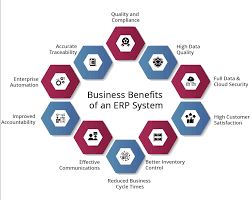
Benefits of ERP Software
Implementing ERP software provides significant advantages:
1. Improved Efficiency
Automation reduces manual tasks and speeds up workflows.
2. Better Data Accuracy
A single source of truth minimizes errors and duplication.
3. Enhanced Decision-Making
Real-time reports help leaders make informed strategic decisions.
4. Cost Reduction
Streamlined processes reduce operational expenses.
5. Improved Collaboration
Departments work together using the same system and data.
Who Needs ERP Software?
ERP is no longer only for large enterprises. In 2026, businesses of all sizes use ERP, including:
Manufacturing companies
Retail businesses
Distributors
Healthcare organizations
Construction firms
E-commerce companies
Small and medium-sized enterprises (SMEs) especially benefit from cloud-based ERP solutions.
ERP Implementation Process
Implementing ERP software involves several key steps:
Needs Analysis – Identify business requirements.
Vendor Selection – Compare different ERP providers.
System Configuration – Customize modules to fit business processes.
Data Migration – Transfer existing data into the new system.
Training – Train employees on how to use the system.
Go-Live & Support – Launch and monitor system performance.
Implementation can take anywhere from a few months to over a year, depending on company size and complexity.
Common Challenges
While ERP offers many benefits, there are also challenges:
High initial investment
Resistance to change from employees
Complex data migration
Customization difficulties
Proper planning and change management are crucial for success.
The Future of ERP in 2026 and Beyond
ERP systems continue to evolve. In 2026, trends shaping ERP include:
AI-powered business insights
Industry-specific ERP solutions
Stronger cybersecurity measures
Integration with IoT devices
Low-code and no-code customization
As businesses become more digital, ERP software will remain a core technology for operational success.